
Use the bug report form to notify the HRS development team of software defects. Include as much detail as possible so the issue can be reproduced and resolved.
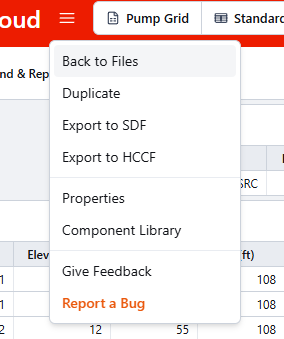
Submit a bug- Open File Menu and select Report Bug.
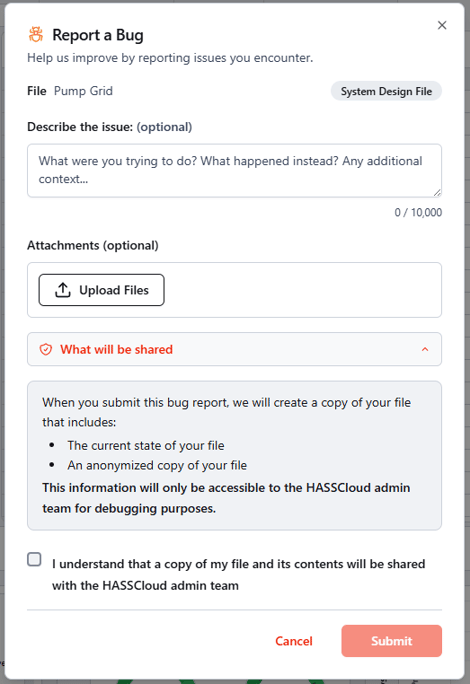
- Describe the problem you are facing. Include details:
- What you were trying to do
- Exact steps to reproduce
- What happened vs what you expected
- Any visible error or warnings message text
- Attach any files or screenshots related to the issue.
- Select Report a Bug to submit.
- Report a bug when behavior appears to be a software defect, not a normal warning or input issue.
- Report a bug if the same issue repeats after refresh/recalculate and basic checks.
- Report a bug if data changes unexpectedly, a feature fails to respond, or a calculation/report cannot complete for unknown reasons.
- Login and Access: Sign-in loops, unexpected access loss, or permission behavior not matching expected access.
- Project and File Behavior: Project not opening, duplicate/create/delete actions failing, missing project in expected folder.
- Save and Sync: Save stuck, save failed repeatedly, stale state not clearing after recalculate.
- Data Input Tables: Cell edits not applying, convert actions failing, values changing unexpectedly after entry.
- Calculation Run: Calculation does not start, hangs, fails without actionable issue detail, inconsistent results on unchanged input.
- Results Dashboard: Modules not loading, status icon mismatch, recalculate button behavior incorrect.
- Report Output: Report not generating, print/export failing, report values/layout appearing incorrect.
- Pipe Tables and Component Libraries: Import/create/update actions fail, expected table/library entries not available.
- Performance and UI: Severe lag, freezing, broken layout, buttons/menus not responding.